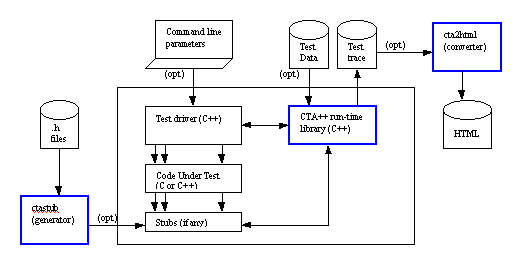
| Figure: CTA++ architecture
Tests are executed with the test bed program. It consists of a
user-written test driver (+ stub units as needed), of the code
under test, and of the CTA++ run-time support library. When
constructing the test driver and the stubs the powerful
test-oriented services of the CTA++ run-time support library are
utilized. On Windows platform portions of the test driver and the stub files can be generated by CTA++/VSI, only the essential
"test-logic" needs to be written by the user.
On the one hand, full C++ power can be used as the scripting
language. Thus, even though the code under test has whatever C++
constructs, like templates, they can be fully tested with CTA++. On
the other hand, thanks to the services of the CTA++ run-time
support library, the tester is saved from implementing much of the
common test harness code, like implementing the notion of a test
case, making the test runs visible, assertion mechanism,
actual and expected value reporting in assertion failures,
unhandled exceptions catching and reporting, PASS/FAIL bookkeeping,
feeding test data to the test bed, stub behavior control,
multithread testing support, etc. In writing the test driver the
tester can concentrate on the essential, on the testing of his or
her code with easy-to-use high level test-oriented constructs. The
very powerful and readily usable test execution infrastructure
comes from CTA++.
There are separate utilities for generating CTA++ stubs from
header files (ctastub) and for converting textual test bed
execution trace files to convenient HTML format (cta2html).
2. CTA++ FEATURES
Here we study some of the CTA++ key features in more detail.
2.1. C++ as the Scripting Language
Full power of C++ can be used in writing the test main program
(test script). The services of CTA++ run-time library (introduced
via cta.h file) are utilized in writing the test script. The CTA++
services are a collection of macros, classes, utility functions and
models for arranging the testing , all helping tremendously the test main
program writing.
2.2. The CTA++ Model of Testing Arrangements
Testing with CTA++ is based on test-case functions, driven by a
test-driver object.
The test driver is a supervisor to the test-case functions. It
is created in the test main program and the test-case functions are
registered in it. The test driver executes the test cases and
keeps track of the events taking place in the tests.
2.3. Assertions
Assertions are a means for checking that the execution of a test
had the effect that the tester expected it to have. CTA++ has
powerful support for assertions, for example the following can be
asserted
- A boolean expression has the value true
- Two comparable values (expressions), designating the actual and
the expected value, are in specified relation with each other (==,
!=, >, >=, etc.)
- An actual value is within an expected range or near enough to an
expected value
- Two strings or memory areas are equal
- Execution of a code block or a single expression throws a
specified exception, or executes without throwing any exception
- Specified stubs get called exactly in the given order
A failed assertion is reported in the trace file. Then,
automatically, also the actual and expected values are displayed.
Here is an example how two failed assertions are shown in the trace
file.
- 255: CTA_ASSERT_EQ(pool2.nbr_of_items(), 20)
- *** assertion failure, line 255 in file
myscript.cc
- actual : 0
expected: 20
- 256: CTA_ASSERT_EXCEPTION(pool2.add(itm2),
Pool::overfill_exception)
*** assertion failure, line 256 in file
myscript.cc
actual : no exception
expected: exception
Pool::overfill_exception
266 CTA_ASSERT_STUBORDER(foo_stub << foo_stub <<
bar_stub)
... // some test script execution,
and later
*** assertion failure, line 34 in file
myscript.cc
actual : stub call to
bar_stub
expected: stub call to
foo_stub
-
CTA++ keeps a record of the executed assertions. A failed
assertion or an unhandled exception turns the test case to FAIL
state.
2.4. Trace of Test Runs, Visibility of Testing
The purpose of testing is to make experiments with the code
under test with the intent of finding errors. In CTA++ assertions
are the primary mechanism for automatically revealing potential
errors.
It is also desirable to get the testing visible and
automatically documented. A track of the following is interesting:
date and time when the tests were executed, which test script was
used, which test cases were executed, which test calls and assertions
were done in the test cases, did the test cases PASS or FAIL, etc.
CTA++ produces this information to the trace file.
In many cases the application uses symbolic names (either by
#define or enum) for various integral values. CTA++ can display
integral values (for example in assertion failures) using symbolic
names, thus making the reporting more useful (vs. 'magic' integral
constants would be displayed).
Not always a full trace is wanted. Sometimes a more compact view
of the test results is more appropriate. CTA++ supports this by
tester-controllable verbosity modes on how the trace file is to be
written:
- Verbose mode. All the information that a script requests to be
written out is written to the trace file. Also the the test case
begins and ends together with the test case PASS/FAIL result is
reported.
- Brief mode. Only test case begins and ends together with test
case PASS/FAIL result is written to the trace file. Possible
assertion failures and unhandled excptions are reported.
- Summary mode. Only one line per test case is written to the
trace file. The line contains the test case identification and
PASS/FAIL outcome.
- Silent mode. No trace file is written. However, a program return code is returned to the
operating system level revealing if the whole test run was a PASS or FAIL.
With the cta2html utility the trace file can be converted to a HTML
browsable form. In that representation and with only a few mouse
clicks you can view the test session in summary level,
zoom-in/zoom-out some specific test case for seeing the detailed
trace level, view the actual C++ script file of the test case, and view
the test data file that provided the input values to the test case. The
HTML representation uses color-coding for highlighting the test
failures and for identifying trace output coming from different
threads.
2.5. Command-Line Parameterization of Test Runs
When a CTA++ test bed program is invoked from the operating
system command level, it recognizes a few command line parameters
by which the test bed run can be further parameterized. The
following three important CTA++ command line capabilities are
discussed here:
Running test cases selectively:
When test cases are registered for running they are assigned an
id. By default all registered test cases are run. Based on test
case ids you can request that only the specified test cases will be
run at this time. It is also possible to request a single test case
to be run multiple times.
Overriding test case parameters:
A test case function can have a parameter. The default value for
this parameter is determined when the test case is registered into
the test driver. However, along with running the test cases
selectively from the command line, you can override the parameter
values for the test cases, if needed. This can be useful when
interactively experimenting how the code under test behaves with
different data values.
Running the test session in different verbosity modes:
The trace file verbosity mode can be specified when the test bed
is invoked.
Now, putting all these features together the following use
scenario becomes possible: First run all the registered test
cases. Take Summary mode trace. See which test cases failed. Then
run the test bed again, but now selecting the failed test cases
only and take the trace in Verbose mode. Study the detailed trace
file for figuring out the problems. Finally further tests can be
made with the problematic test cases by giving them modified
parameter values from the command line. Of course, the test bed can
be run under a debugger, too.
2.6. Test Data, Test Data File
CTA++ System provides many useful means for writing the test
main program (test script). One of such means is CTA_TestData type.
It is a class, which encapsulates the notion of test data in a very
flexible and easy to use manner. CTA++'s test data could be
(somewhat simplifyingly) viewed as a struct that can have any number
of data members of any type. In the test script the test data items
can be conveniently extracted from the CTA_TestData object with
>> operator.
One of the test case function parameter variants is of
the type CTA_TestData. When such a test case is explicitly invoked from
the command line, the CTA_TestData aggregate can also be given.
A test case function (having a CTA_TestData parameter) can also be
registered so that it will read its parameter from a textual Test
Data file. Here's an example:
-
- ...
- TESTDATA "55" {
- ("Hello", 5, "Hello"),
- ("How are you?", 12, "I'm fine"),
- ("How are you?", 3, "Don't understand")
- }
- ...
This is an excerpt of a test data file. The above section
contains three test data sets (CTA_TestData aggregates) for the
test case with id "55". When the registered test case "55" comes
to execution, the associated test case function is actually
called three times. For each call the CTA_TestData aggregate has
been evaluated from the Test Data file for the function parameter.
As a matter of fact, the test case "55" is three separate test
cases. The trace file shows with which test data set the test case
was executed on each of the calls.
The capability to override test case parameters from the command
line, and especially the CTA++'s test data concept, manifest the
important capability where the test data can be off-loaded from the
hard-coded test main program logic. The test data file can be easily
modified and extended without needing to recompile the test main
program and link the test bed. The test data can be in a separate, simple and compact text file. It need
not be scattered in the test bed code (the "test execution engine"). All this mechanism and much more is
automatically provided to you by the CTA++ system.
2.7. Stubs
Stubs are simulated functions whose behavior is controlled by
the tester and which are called by the actual code under test.
Typical needs for using stubs are the following:
- Simulation of target hardware dependent functions, which can
not be run in the host test environment.
- Simulation of the functions, which have not yet been
implemented.
- Arranging hard-to-produce error return codes for the called
functions for ensuring thorough testing of the actual code under
test.
- When the testing process rules require "testing in
isolation".
CTA++ has powerful support for stubs. Defining a stub and
setting an intelligent behavior on it is very easy. Here is a
simple example to show the idea:
In a test script in the global scope you might define
CTA_STUB (void*, my_alloc(size_t sz), my_alloc_stub)
CTA_BODY(1) {
CTA_PUT(sz)
CTA_ASSERT_IN(sz, 8,
256)
return malloc(sz);
}
CTA_BODY(2) {return malloc(sz);}
CTA_ENDSTUB
In some test case function, then, there could be
- my_alloc_stub.actionList() << repeat(5) <<
body(1) << repeat() << body(2);
which means that during the next 5 my_alloc calls it will behave
according to CTA_BODY(1), and thereafter it will indefinitely behave
according to CTA_BODY(2).
Later you might want to test how the code under test manages the
end-of-heap condition and set on the stub
my_alloc_stub << 0;
which means that the stub returns 0 (null pointer) each time it
is called from now on.
CTA++ has a utility (ctastub), which reads a header file and
generates null-behaving CTA++ stub definitions for the standalone
and member functions that the header file contains. Later it is
easy for you to edit such intelligence to the stub as the testing situation needs. The "infrastructure" to use the stubs is provided by CTA++.
2.8. Testing Multithreaded Code
CTA++ is implemented to cope with testing of multithreaded code.
Firstly, the code under test may have been divided into threads and
each of them may issue calls to the same global stub functions.
Secondly, this being perhaps a more interesting case, the test
main program may itself divide into threads. Each of those threads
can set up their own test drivers, which run in parallel. Thus it
is possible to make a testing arrangement where the code under test
is being called in parallel from multiple threads. Where needed,
the tester may set up some synchronizing mechanisms between the
threads and obtain controlled call ordering from the threads.
2.9. Access to Object Private Members
CTA++ has a straightforward mechanism on how
the object private members can be accessed at the time
of testing (in the test main-program and in the test-case
functions)..
2.10. Usage with Code Coverage Tools
From the operating system's point of view a CTA++ test bed is a
normal program. A coverage tool can be applied on the code under
test for measuring whether all code is exercised. For example,
Testwell's CTC++, Test Coverage
Analyzer for C/C++, can be used.
2.11. Usage with Run-Time Error Detecting Tools
Run-time error detecting tools reveal memory leaks, bad usage of
pointers, overwrite of memory buffers, bad operating system calls,
etc.
Firstly, any run-time error detecting tool can be applied,
because the CTA++ test bed is a normal program. The tool findings
are per whole test bed run.
Secondly, if the error detecting tool has an API, a step further
can be taken. CTA++ supports a novel way how the error detecting
tool can be integrated to the CTA++ model of test driver and test
cases. As a result the tester can read from the CTA++ trace file in
which test case the memory leaked or some other anomaly occurred as
detected by the tool.
2.12. Reusing of test code
Assume a situation where a class has been developed (class A)
and it has been tested by CTA++. So, for the class A there is a
CTA++ test suite. More concretely there exists a collection of test case
functions, each testing some functional properties of class A type
objects.
Then assume that later class B is derived from class A and the
developer is faced with the task of testing this new class B.
Assuming that class B must still satisfy the class A properties,
here it would be handy to be able to reuse the test code (test
cases) that there are already for testing the class A.
CTA++ facilitates a straightforward means to arrange the testing
so that the test case functions for class A type of objects can also be
used to test class B (or any inherited class thereof) type of
objects. For testing class B only such test case functions need to
be developed that test the new functionality of class B. The
existing test case functions for class A can be reused in testing
class B.
3. USE OF CTA++/EXAMPLE
We have the interface of the code under test in the filelist.h.
It contains a couple of class declarations. In this example
we test the operations of the class List. The implementation file is in
list_bug_cpp. The list_bug_cpp file calls onwards a couple of functions,
whose interface is declared in the file memory.h.
In this example we use stubs for the functions declared in the memory.h file.
3.2. What needs to be done for the test bed
All CTA++ test beds need a test main program. It contains the test bedmain() function, the test case functions, etc.,
see CTA_vsList_drv_cpp.
For the stubs we have constructed CTA_memory_h_stb_inc file.
The CTA_vsList_drv_cpp file #includes teh stub definition file. In this example we use also a data file to feed test data to the test bed, see
CTA_vsList_drv_dat.
All these three files here are actually initially generated by CTA++/VSI (thatīs why their naming and certain "oding conventions"),
but they could have been constructed also directly by the user.
3.3. Command line mode use
The above CTA++ test bed could be compiled like any C++ programm, for example as follows:
- cl -Febed.exe list_bug.cpp CTA_vsList_drv.cpp cta.lib
The resultant bed.exe program recognizes some set of command line parameters
(test bed run verbosity, where to write the trace, to run only some selected test cases, to give other parameters to the test bed run). For example, it could be run as follows (all test cases in it):
Next, the trace file could be converted to HTML format as follows:
And you can view it with your default browser as follows:
See the complete HTML report here
(the test bed was constructed, compiled and run via CTA++/VSI, but effectively the same contents could have been achieved also in command line mode).
3.4. CTA++ Visual Studio Integration
On Windows the CTA++ usage can be done fully in the Visual Studio IDE framework.
See more detailed description of CTA++/VSI
4. SUMMARY OF BENEFITS
CTA++ benefits can be summarized as follows:
- Automated test execution
- Repeatable tests, regression testing
- Visibility and documentation of test executions
- HTML representation of test results showing summary and
detailed views
- Reporting in 'application domain' (displaying in #define/enum
symbolic names)
- Reusing of test cases saves work in derived class testing
- Early unit testing
- Testing in isolation (use of stubs)
- More testing possible in the host environment (use of stubs)
- Stub generation from header files
- On a Windows platform CTA++
integration to Visual Studio
CTA++ test beds can be used together with the Testwell CTC++,
Test Coverage Analyzer for C/C++ (see CTC++
description ). When used together CTA++ gives the black-box
(behavioral) testing approach and CTC++ gives the white-box
(structural) testing approach. CTA++ test beds are "the test
execution engine" with strong automation. CTC++ is used to measure
that all code was exercised during the tests.
5. OPERATING ENVIRONMENTS
CTA++ is available in the following machine / operating system /
C++ compiler environments: CTA++ availability.
|